Many WooCommerce store owners want to hide out-of-stock products in WooCommerce while still being able to show specific out-of-stock items when needed.
Unfortunately, WooCommerce only provides a global hide out-of-stock setting. Once enabled, all out-of-stock products disappear from the shop and search results — with no way to control visibility per product.
If you’ve ever wished you could choose which out-of-stock products stay visible and which ones don’t, you’re not alone.
This article explains:
- Why WooCommerce’s default behavior is limiting
- When hiding out-of-stock products actually hurts your store
- How to manage out-of-stock product visibility in WooCommerce per product
The problem with WooCommerce’s “Hide out-of-stock items” setting
WooCommerce gives you a single checkbox:
Hide out-of-stock items from the catalog
When enabled, this setting:
- Hides all out-of-stock products from shop pages
- Removes them from search results
- Applies globally across the entire store
There is no per-product option.
Common problems store owners run into
❌ Important products disappear completely
Some products go out of stock temporarily:
- Seasonal items
- Popular bestsellers
- Products awaiting restock
When these products vanish from the catalog, customers may think:
- The product was discontinued
- The store no longer carries it
- They should buy elsewhere
❌ Customers can’t find products they already know
If a customer searches for a product name and it’s out of stock:
- It won’t appear in WooCommerce search
- It won’t appear in category listings
- It becomes difficult to reach, even if the product page still exists
This is a visibility problem, not a stock problem.
❌ No clean workaround without custom code
To work around this limitation, many store owners try:
- Custom PHP snippets
- Theme modifications
- Manually changing product visibility every time stock changes
These approaches are:
- Hard to manage as the catalog grows
- Time-consuming
- Error-prone
When showing out-of-stock products actually makes sense
Hiding everything may look tidy, but there are many cases where showing an out-of-stock product is the better choice:
- Customers want to bookmark or inquire
- Products are restocked frequently
- You want to keep SEO value from existing product pages
- You want to display alternatives or related products
- You prefer transparency instead of removing items completely
The real issue isn’t hiding out-of-stock products —
it’s not being able to choose which ones stay visible.
Can WooCommerce hide out-of-stock products per product?
By default, WooCommerce cannot hide or show out-of-stock products per product.
The global setting applies to all products equally.
There is no built-in way to control:
- Which out-of-stock products appear in shop pages
- Which appear in search results
- Which remain completely hidden
This limitation is why many store owners search for a WooCommerce out-of-stock visibility solution.
A focused solution: per-product visibility for out-of-stock items
To solve this specific gap, I built a small utility plugin called:
Hide or Show Out-of-Stock Products for WooCommerce
The idea is simple:
Disable WooCommerce’s global “hide out-of-stock”—
Control the per-product visibility for exceptions.
What the plugin does
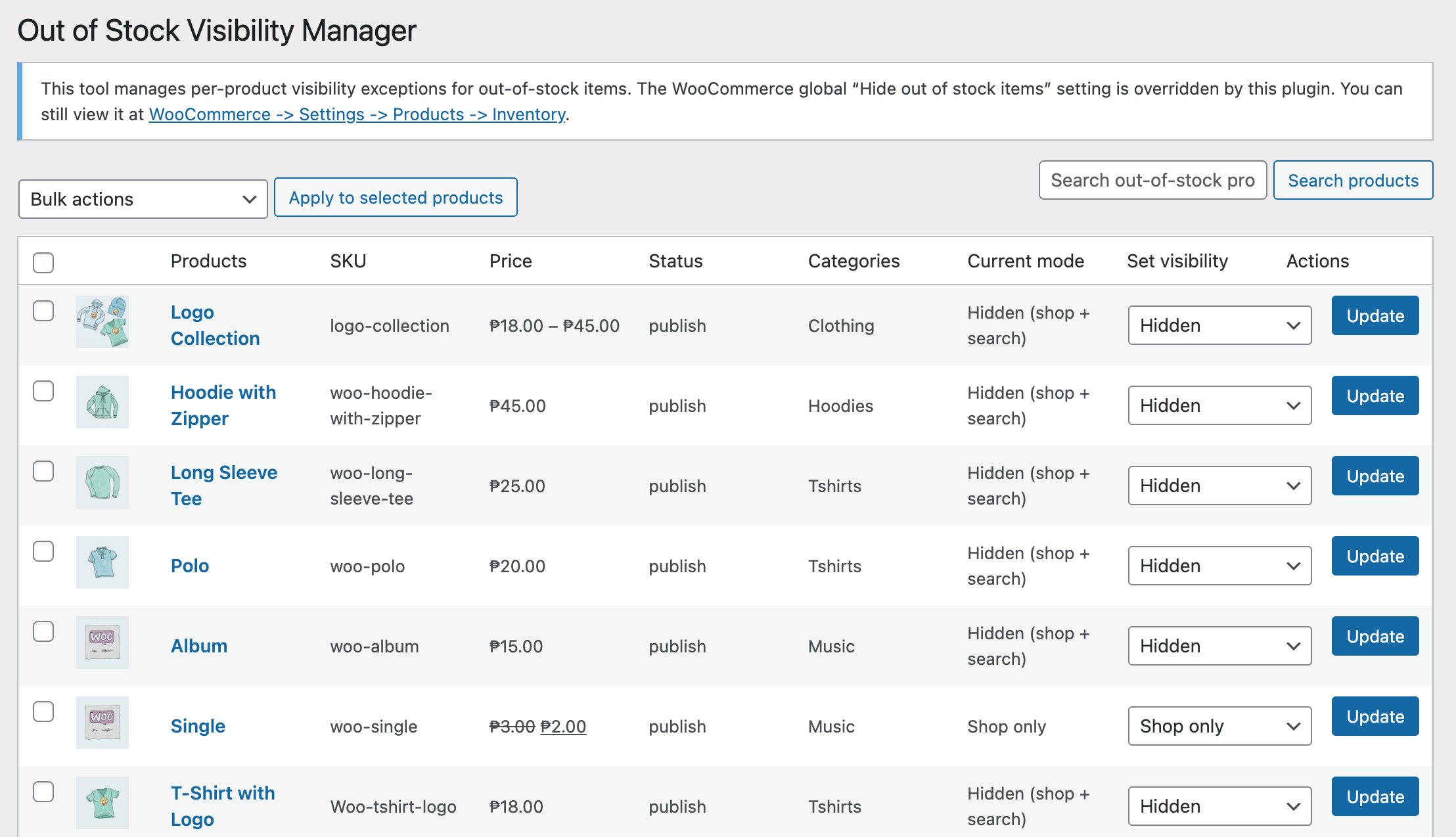
Forces WooCommerce’s global “Hide out of stock items” setting off so per-product control applies.
It allows you to:
- Control out-of-stock product visibility per product
- Choose whether an out-of-stock item appears in:
- Shop and search results
- Shop only
- Search only
- Nowhere (fully hidden)
- Bulk manage out-of-stock products from one admin screen
- Use WooCommerce’s native product visibility system
There are:
- No custom product types
- No performance overhead
- No changes to how stock management works
Who this plugin is for
This plugin is useful if you:
- Want per-product control without writing code
- Manage products that frequently go out of stock
- Care about both user experience and SEO
It is not designed to:
- Replace inventory management
- Add waitlists or backorders
- Modify stock calculation logic
Its purpose is focused: visibility control only.

Why this approach works better
- Disables the global hide setting so out-of-stock control is intentional and centralized
- Still relies on WooCommerce’s built-in product_visibility terms (no hacks)
- Keeps behavior predictable and easy to revert or adjust per product
You stay in control of:
- Which out-of-stock products remain visible
- Which are hidden from the catalog and search
Download the plugin
The plugin is available for free on WordPress.org:
👉 Download: Hide or Show Out-of-Stock Products for WooCommerce
https://wordpress.org/plugins/out-of-stock-display-manager-for-woocommerce/
If you’ve been looking for a way to hide or show out-of-stock products in WooCommerce per product, this plugin was built specifically for that purpose.
Final thoughts
WooCommerce is flexible, but some limitations only become obvious in real stores.
Per-product out-of-stock visibility is one of those gaps.
If this article helped you understand the limitation — or saved you from writing custom code — then the solution has already done its job.
Leave a Reply